PocketFlow Creator
Post Stastics
- This post has 1310 words.
- Estimated read time is 6.24 minute(s).
If you’ve built anything with PocketFlow, you know its appeal: the whole framework is about 100 lines of Python. A workflow is just a graph of nodes, each with a prep → exec → post lifecycle, connected by actions (the string a node’s post() returns), and sharing data through a plain Python dict called the shared store. No vendor wrappers, no dependency tree, nothing hidden.
That simplicity is great in code, but once a flow grows past a handful of nodes — routers, retries, sub-flows, human review steps — it gets harder to see. Which node writes summary? What happens when the classifier returns reject? Is that edge even wired?
PocketFlow Creator is a desktop app that answers those questions visually. It’s a RAD-style (think Delphi or VB, but for LLM workflows) IDE built on PySide6 where you:
- Design flows by dragging nodes from a palette onto a canvas and wiring action ports together
- Configure every node in a live Object Inspector — prompts, models, temperature, shared-store keys
- Validate the graph (missing start node, dangling edges, undeclared actions) with error badges right on the canvas
- Run and debug flows in place, with a Run Log, a Shared Store view, breakpoints (F9) and step-through debugging
- Export the result as plain Python — either a full PocketFlow project package or a single self-contained script with zero third-party dependencies
Note: PocketFlow Creator is an independent project inspired by PocketFlow. It is not an official PocketFlow project and isn’t affiliated with or maintained by the PocketFlow team. If you prefer to stay entirely code-first, upstream PocketFlow is still the right tool.
What’s in the box
As of version 0.3.2, the palette ships with 90+ built-in node types across 28 categories. A sampling:
| Category | Examples |
|---|---|
| Flow control | Start, Stop, Router, Subflow |
| LLM / AI | LLM Prompt, JSON LLM, Classifier, Agent, RAG, Judge |
| Reasoning | Chain of Thought, Majority Vote, Supervisor, Debate |
| Data & retrieval | Text Chunk, Embed, Vector Index/Retrieve, NL→SQL |
| Integration | Web Search, API Call, MCP Tool, Webhook, Email, Slack/Discord notifications |
| Resilience | Retry with backoff, Rate Limiter |
| Human-in-the-loop | Human Input, Human Review |
On the model side, you can point flows at local hosts (Ollama, LM Studio) or cloud APIs (OpenAI-compatible endpoints, Anthropic, Gemini). There’s also a built-in mock provider, so you can design and test a flow without any LLM at all.
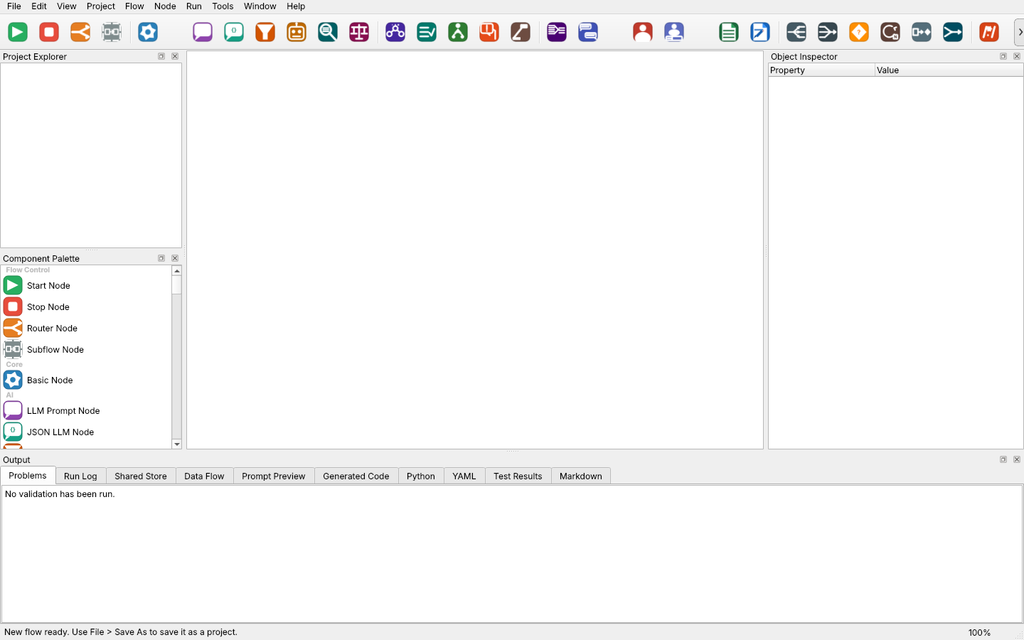
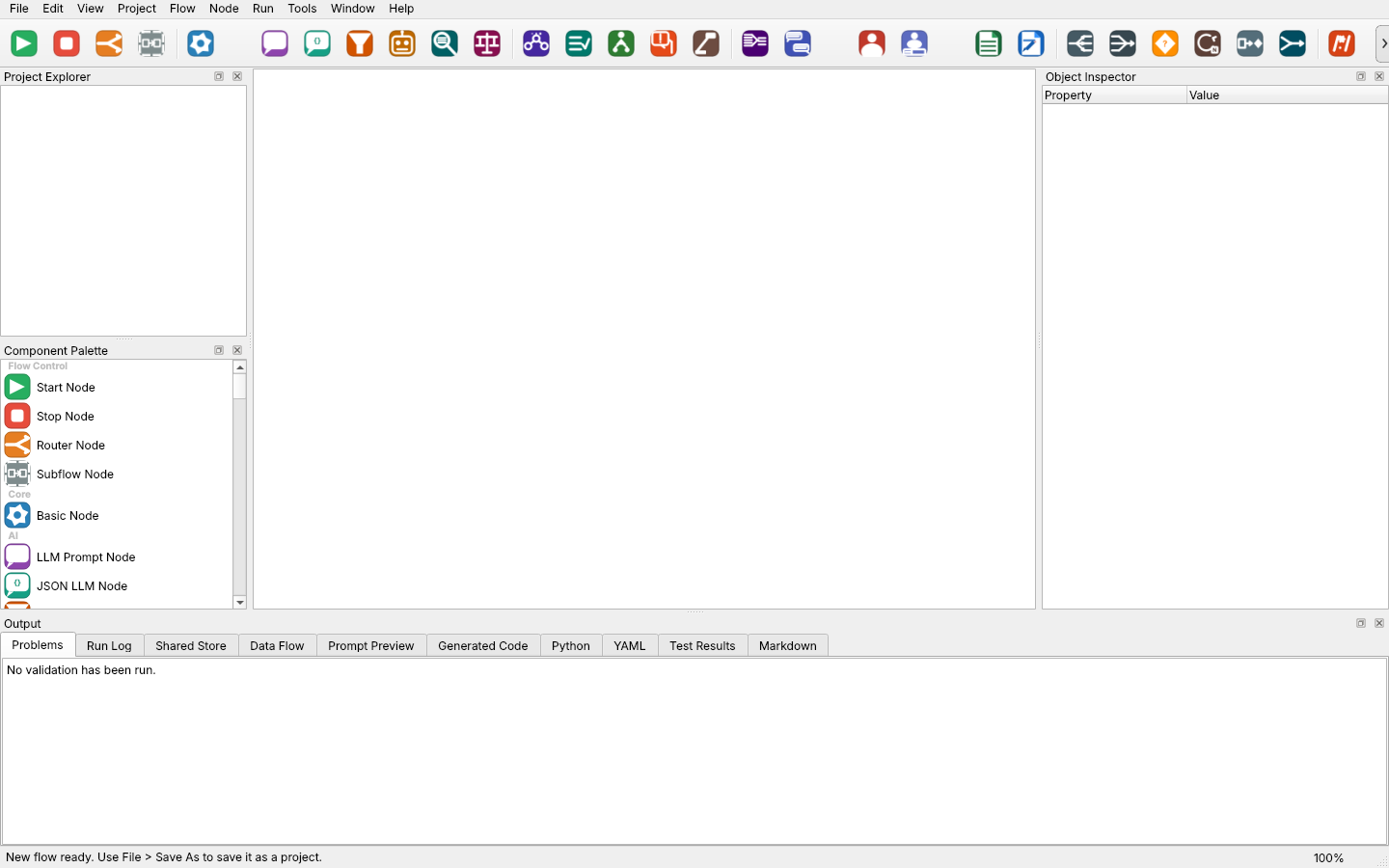
The main window. The node toolbar across the top mirrors the Component Palette on the left.
Tutorial: Your first flow in about 10 minutes
We’ll build the smallest useful flow — Start → Summarize → Stop — that turns a block of release notes into a one-line changelog entry. Then we’ll run it inside the app and export it as a standalone Python script.
1. Install and launch
PocketFlow Creator needs Python 3.10 or newer. A virtual environment is recommended:
python -m venv .venv
source .venv/bin/activate        # Windows: .venv\Scripts\activate
pip install pocketflow-creator
pocketflow-creator
The app opens with an empty, untitled flow so you can start sketching immediately.
2. Create a project
Choose File → New Project…, name it NoteSummarizer, and pick a parent folder. Creator writes a NoteSummarizer.pfcproj.yaml project file and a graphs/main.pfcgraph.yaml graph file — both plain YAML, so they diff nicely in Git.
3. Add three nodes
From the Component Palette, drag these onto the canvas, left to right:
- Start Node (Flow Control)
- LLM Prompt Node (AI)
- Stop Node (Flow Control)
4. Wire them together
Hover over the Start node’s default port on its right edge, drag to the LLM node’s input port on its left edge, and release. Do the same from the LLM node’s default port to the Stop node.
Those edge labels matter. In PocketFlow, post() returns an action string, and the flow follows the edge with the matching label. A linear flow only needs default; a branching node (like a Classifier) gets one output port per action.
5. Configure the LLM node
Click the LLM node and fill in the Object Inspector:
| Property | Value |
|---|---|
| Title | Summarize |
| prompt_type | string |
| prompt_file | Summarize these release notes in one sentence for a changelog: Version 2.4 adds an offline mode, fixes a crash when exporting large CSV files, and drops support for Python 3.9. |
| temperature | 0.3 |
| max_tokens | 256 |
| output_key | summary |
| Writes | summary |
With prompt_type set to string, the prompt_file field holds the prompt text itself. (Set it to path instead to point at a Markdown file under prompts/, which is handy for longer prompts you want under version control.) The Prompt Preview tab at the bottom shows exactly what will be sent to the model.
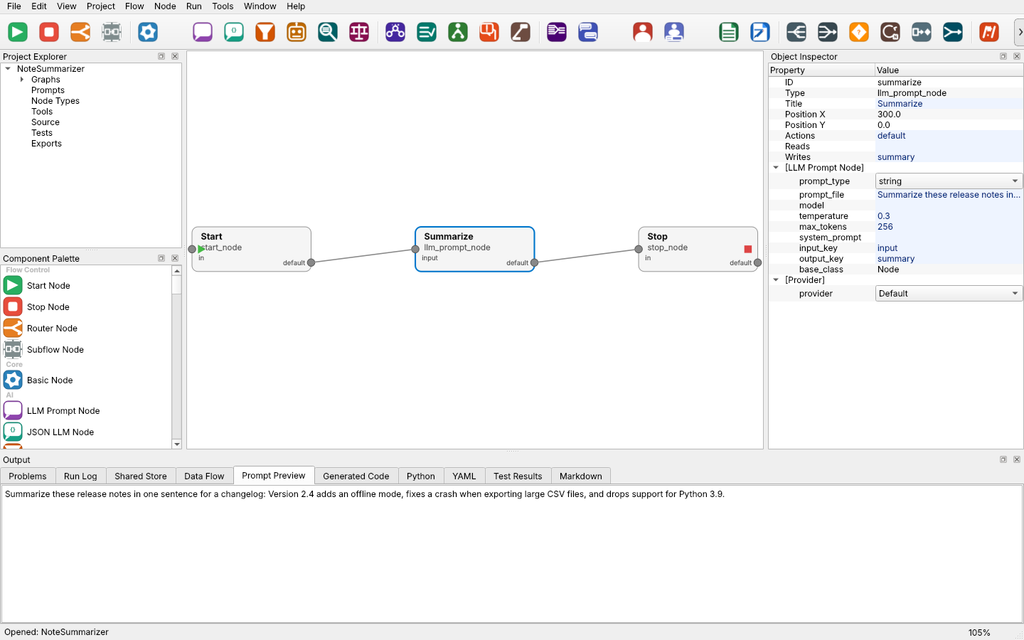
Tip: Fill in Reads and Writes for every node. They aren’t enforced at runtime, but they power Project → Data Flow Report, which shows which node produces and consumes each shared-store key.
6. Validate
Press Ctrl+Shift+V (Project → Validate Project). The Problems tab should report no issues. If something’s wrong — no start node, an edge pointing nowhere, an action that isn’t declared — the offending node gets a red badge on the canvas.

7. Run it (no LLM required)
Press F5 (Run → Run Active Flow). Until you configure a real provider, Creator uses its mock provider, which simply answers mock response. That’s enough to confirm the flow executes end to end:
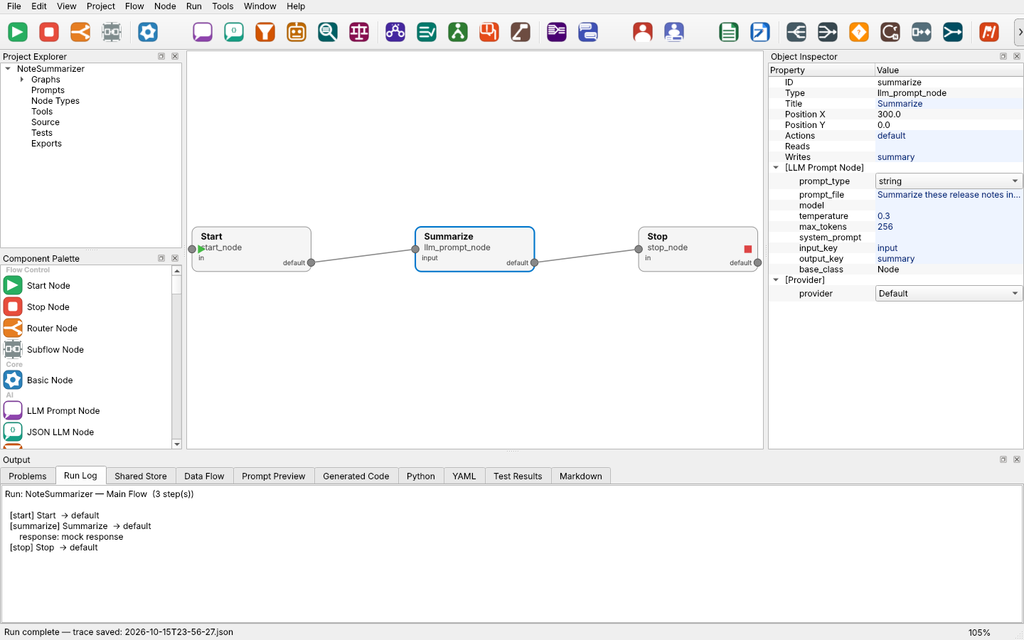
Each run is also saved as a timestamped JSON trace under run_reports/ in your project, with the shared store captured before and after every node. The Shared Store tab shows the final state — here, a single summary key.
8. Connect a real model
Now let’s get a real summary. If you have Ollama installed:
ollama serve
ollama pull qwen2.5-coder:14b
In Creator, open Tools → Provider Manager…, click + Add, choose Ollama (local) as the API type, and keep the defaults (http://localhost:11434, qwen2.5-coder:14b). Click Test Connection, then Set Default ★.
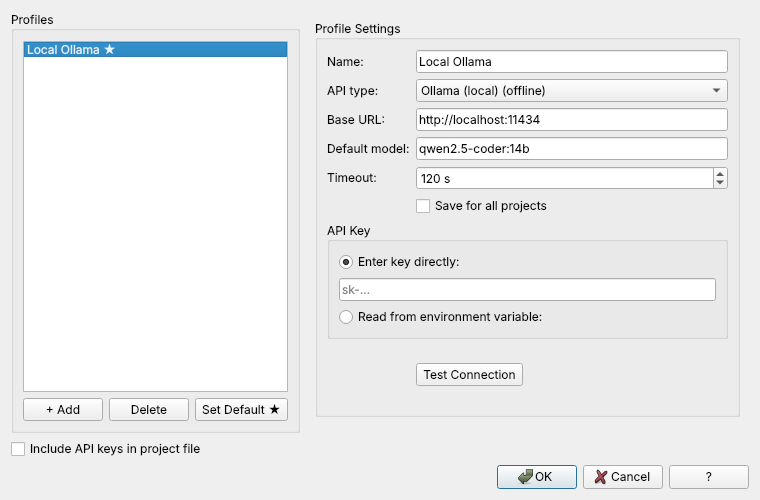
Cloud providers work the same way: pick the API type, paste a key (or tell Creator to read it from an environment variable), and test. Keys stay out of the project file unless you tick Include API keys in project file.
Press F5 again and the Run Log now shows your model’s one-sentence summary instead of the mock text.
9. Export to plain Python
Press Ctrl+G (Project → Generate Code). Creator writes a standalone script to generated_scripts/main.py in your project folder.

That one file contains the node logic, the flow wiring, and the provider client, and it uses only the Python standard library. Run it anywhere Python runs:
cd NoteSummarizer
python generated_scripts/main.py
You’ll see something like:
Running: NoteSummarizer — Main Flow

✓ Flow completed successfully

Final shared store:
{
  "summary": "<your model's one-sentence summary>"
}
Need more than a single script? File → Export PocketFlow Project… writes a full package with generated/, tests/ and a custom/ folder for hand-written node code that’s never overwritten on re-export. File → Export Standalone Archive… zips the scripts together with requirements.txt, setup/run scripts for Linux, macOS and Windows, and a README — ready to hand to someone else.
Where to go next
- Branch your flow. Drop a Classifier Node between Start and Summarize, set both its Actions and its
categoriesproperty to something likebug_fix, feature, and wire each action to a different LLM node. The node grows one output port per action. - Debug with breakpoints. Select a node, press F9 to set a breakpoint, then Shift+F5 to debug the flow, pausing and resuming as you watch the Run Log fill in.
- Tidy up big graphs. Ctrl+Shift+L auto-arranges the canvas with layered, grid or force-directed layouts and straight, curved or right-angle connectors.
- Read the built-in help. Press F1. The app ships with getting-started pages, a four-part tutorial series and a node reference.
PocketFlow Creator doesn’t replace PocketFlow — it gives you a canvas for it. You sketch and debug visually, and you still walk away with ordinary Python you can read, version, and run without the designer.
Links
- PocketFlow Creator on GitHub: https://github.com/Monotoba/PocketFlowCreator
- PocketFlow Creator on PyPI: https://pypi.org/project/pocketflow-creator/
- PocketFlow (the upstream framework): https://github.com/The-Pocket/PocketFlow